Did we help with your project? Buy us a Cup of Coffee!

No Slip Adventures 1 by William

Time for a new upgrade in the truck. People put things on my dash all the time and they slide off in a turn. You would think they would learn, but they just keep doing it. So, lets fix them. I’m going to try and come up with a few more uses for this material I bought, so stay tuned for more No Slip Adventures.

DshQkStc_001Grip it, or whatever. I chose this at Harbor Freight, cause it was cheep, and it was really thick!!!!!! I’m not much for this type, cause of the holes, but I figured it would work better in the truck. It was 6.50, which is a bit high, but this product really impresses me.


DshQkStc_000

Here is our culprit, the dash. Just a smoothish plastic surface. The turtle is the old system for turning the black truck. If it slides out of the center, then I’m turning to fast, or hard. Well, with the new truck, that system doesn’t work. Even as much as I like putting everyone’s junk that is on my dash on the floor I decided to be nice and fix the situation.

Wow, I must have got into this project, lets fast forward past the whole cutting process (which I forgot to take pictures of.)

DshQkStc_007

You can see the tools I used for this project in the picture. Scissors, a knife, and some scotch tape, because I did not have any two sided tape.

Luckily the roll was as wide as the part on the right, so I just had to cut out a small section. I found out the pattern on the mesh was not square with the length, but I made it work. I set the piece in place, and used the knife to try and get a general shape, cutting it, but not to hard so I didn’t damage the dash. The scissors cleaned it up after that.

DshQkStc_002DshQkStc_003 

I took a strip of tape the width of the .. well, I guess you could say length, but whatever. and then rolled it to make some double sided sticky tape.

DshQkStc_004 DshQkStc_006

I stuck it in place, and it is currently holding. I did this 3 times on the long piece, and only 2 times in the center. Double sided tape would work much better in this situation, and the dash is textured enough that the tape is easily removable and replaceable or what not. The material used is washable by hand, so if something was to spill on it, this is cleanable! Well, I hope this gives you some idea’s for your own vehicles. this material is holding up great for the last 4 days. The turtle is sort of stuck to it. So it is definitely some good material.

Check out the full article >>

Dell Inspiron 6000 Password Reset by Brett

I was given a laptop this weekend by a coworker who had forgotten their password. Usually resetting a CMOS / BIOS password would be an easy task to complete. With most computers you just move a jumper, flip a dip switch, or in some cases, it’s as easy as pushing a button. Laptops are a bit more complicated. Sure, some still have jumpers, but most do not. If your lucky, you’ll have a removable CMOS/RTC battery so you can just pull that and your computer will ‘forget’ the password (along with all of your BIOS settings store in the CMOS!) Dell (and to be fair a number of other manufacturers) takes this a step further on some models of laptops. Since laptops are a big target for theft and passwords are in place to prevent unwanted people, say a thief, from getting to the data, Dell (and others) have come up with a number of different methods over the years to make this task difficult as a deterrent (and as another ‘feature’ to sell the laptop). The problem is, when a legitimate user gets locked out of their own computer, it can be frustrating (not to mention in some cases, expensive!)

The laptop in question was one of those special situations. When turned on, it would bring you to a white / grey screen prompting for a password. The password is actually stored on a special NVRAM chip along with some other information about the laptop (Service Tag, Owner Info, Asset Name, etc.) While there are tools supposedly to find out the ‘master’ password via the service tag, I was not able to get those to work. There are plenty of people online that claim for $50 they can give you the answer, but I don’t like going that route for a number of reasons. I gathered bits of information from all over the internet and formulated a plan.

First, I had to get to the chip. This involved stripping the laptop down to the system board, but leaving key components connected since I would need to have the laptop running for parts of the procedure.

CIMG1708b CIMG1714

Next, I had to selectively disable the eighth leg on this chip to fool the computer into thinking it was brand new and reprogram it. The choice method for this was to carefully wick the solder from the leg and then thread VERY thin wire behind the leg. Next, with gentle pressure on the wire, I tapped the iron to the leg to break the remaining bond and like a dog to a fire hydrant, the leg lifted off the board.

CIMG1688 CIMG1697 CIMG1699

Next, I tried to turn the laptop on to see if there was a change. This sent me into a bit of a panic, since the laptop refused to even turn on now. The way I saw it, I had either broke something or this was a normal reaction to having that leg off. I decided to test my hypothesis by reattaching the leg. After doing so, the laptop turned on and I was once again greeted by the password screen.

Okay, so- normal operation. This means that without the chip, you can’t turn the laptop on, but with the chip, you can turn it on but have to enter a password. Thankfully, us humans are still smarter than computers, even if just. Here is where we lie to the computer a bit. It won’t turn on unless that chip is in place, so what I did is use a dental pick (another tool that should be in your collection) to bridge the connection and allow the computer to turn on. Shortly after the screen initialized, I removed the pick so when the computer went to read it, nothing. This caused it to enter a special ‘Manufacturing Mode’ where the computer redetects and sets up the hardware, including our chip. The first time around it started in Level [FF], which I am assuming is the flash mode where it reset the chip. Every reboot after that and it’s just Level [01].

CIMG1705 CIMG1701

The results so far are pretty promising, so I soldered the leg back down. After that, I was able to exit manufacturing mode.

CIMG1719

Success! A normal boot from the hard drive. Only one issue remained. Remember I told you about the extra info stored on the chip? Well, the service tag was on there. It’d be nice to put that back for a number of reasons, mainly because without it, I don’t think you can set another password. Dell provides a utility to change the values stored on the chip called ASSET_A209.COM. To use it, I needed to make a bootable USB drive (Good instructions for that here). After the flash drive was ready I copied over the asset software and proceeded to boot from the drive. Then it was just a matter of running the program with the /s switch followed by your service tag number (ASSET_A209 /s ABCD123)

CIMG1721 CIMG1726

It’s worth mentioning that the service tag can only be programmed once, so get it right the first time or else the whole process will have to be repeated. I know a certain coworker that is going to be happy on Monday (also, you owe me a lunch or two :-)

2010-01-20 Update:

Midnight Mods reader Tommy Chooi has reported that you should be able to reset the password by calling dell and verifying ownership of the laptop. After verification, they will generate a password for you based on your service tag. Thanks Tommy!

2010-02-20 Update:

Reader Dave says “Found shorting out pins 3 and 6 while turning it on did the trick (a bit easier than disconnecting pin 8).” – Thanks Dave!

Let us know what worked for you!

Check out the full article >>

Soldering - Part 1 by William

I have not had a chance to solder in a while, so I am taking this opportunity to start the soldiering series to help out those who are just getting into soldering. Today, at the makeshift Midnight Mods base, we are going to discuss soldering wires together. This is one of the easiest way to practice soldering. How much solder you use is very important to the bond of the components. To much solder can make it weak and not enough can not give you the desired effects. I will discuss more of what a proper solder looks like in the next article.

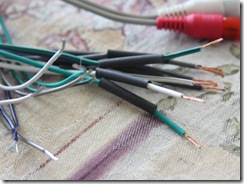
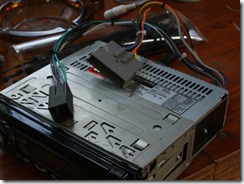
sldrng01_000We need some soldering tools and some wire today. My wire happens to be the stereo harness for my truck. We need to solder these two wires together to complete the speaker harness for the stereo head. The harness is different from my 95’s, so we need to make this one work.

I’ve stripped the wires and put a little twist on them to keep them neat. The twist helps them pull solder in easier. A good twist is important. Over twisting can be bad, the twist also helps with structure. If you just solder the wires together strait, they will bend easily and that will break the solder. Remember, solder is a fusible metal alloy. We are heating up the wire and draw the metal into the object we have heated up.

To do this properly, we are going to use heat shrink tubing (in the picture above). These looks like little rubber sleeves, which is what they are. They shrink when heat is applied to them, and they protect the joint. You do not need to use this for practice, this is for a finished product.
sldrng01_001 I slipped the tubing on before soldering, cause, well you cannot put it on after you have completed the joint.
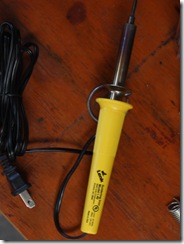
sldrng01_003Here is the soldering iron we are using today. Lets plug it in and warm it up. This is a 40 Watt iron. I use an 18 watt at home. Heat is the killer for your components, you want to use the least amount of heat possible when you solder, this will reduce the risk of damaging components while soldering. Also, a higher watt iron is more likely to carbon up.
sldrng01_006 sldrng01_005

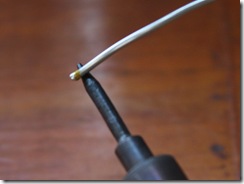
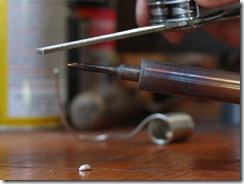
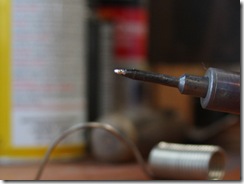
The tip looks really carboned up. Most people don’t know how to care for the tips, which is okay, I can fix this!  You can see the solder is not melting on the tip and sticking like it should. An iron, when taken care of, will hold solder on the tip when you apply solder to it, this is called “tinning the tip.” Just a hot iron will not transfer heat into the object, you use the solder on the tip as the medium to get a good transfer.

sldrng01_007sldrng01_008 

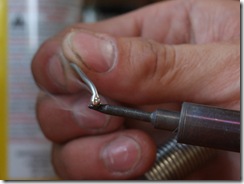
I could only find some steel wool. I usually use a scotch brite pad. They work good. Unfortunately, the steel wool was not abrasive enough, lets go to drastic measures.
sldrng01_009sldrng01_010 

You should file these while they are cold. it works much better so you can start the iron up with solder on it to tinn the tip properly. I already had it running. You can see in the second picture that it finally held some solder. I didn’t want to spend much time working on it, the tip was really flimsy compared to what I am used too. They generally are copper, because copper is a very good medium for transferring heat!

sldrng01_004

To get warmed up, we are going to practice some soldering to make sure the iron is hot enough, and the solder is flowing well. I have stuck this piece of wire into the vice and have twisted the end, now to give it a test.

sldrng01_011

Aww rats, that is way to much solder. Lets try this again.

sldrng01_012


There we go!


It is important to try and practice some while you do this, no matter how good you are, we always need practice, otherwise we end up with fried components, or over soldered connections.

sldrng01_002
Lets get these wires soldered together. You can see I have twisted them together in the middle trying to make one wire. The quick way would be to do it like a twist tie, but that makes the wire large, and the heat shrink would not fit over top of them.

sldrng01_013

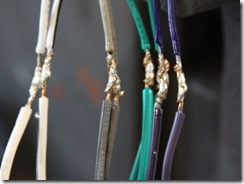
I am actually not moving the iron. The iron is sitting in a stand on the bench, I am holding the wire over the tip with one hand and applying the solder with the other. This is a good work around when you do not have a pair of helping hands. It just takes more time because I cannot isolate the joint as easily. Also, with this method, the wires do not like to stay twisted together, so it takes more effort to keep them together before soldering, cause you are using one hand for solder, and the other to hold the wires.
sldrng01_014 sldrng01_015

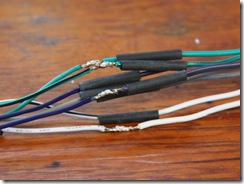
We got them all together now, and we can start soldering. Make sure to keep the tubing away from the joint, this is another reason to use the least amount of heat. Wire transfers heat, and it will shrink the tubing. If you are really worried, throw on an alligator clip as as heat sync, The heat will travel to there, because heat’s goal is to even out across the surfaces, so it will go to the cold clamp. Do not use to tight of a clamp though, it could damage the wire.

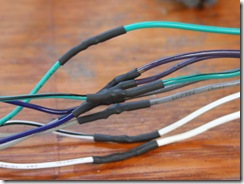
sldrng01_016sldrng01_017 

To shrink the tubing I used a torch. This is not really the proper way to do it, but it works in a pinch. Do not ever hold the flame on the tubing, it will melt. You want to move the heat towards the tubing until it starts to shrink, and make sure you move it around and don’t hold it directly on one spot, this will also damage the tubing and cause it to curl up. The proper way to shrink it is to use a heat gun. You can still melt the tubing, but it is much harder. The gun is also more safe than an open flame. In a really big pinch, you can use a lighter as well.

sldrng01_018sldrng01_019 

And for the final touches, I’ll zip tie the wires together, and we are done! I know this article might sound a bit incomplete, but this is a practice type introduction for people wanting to solder. Take your time and practice on junk wire. If you are unsure if it is a good solder, send in a photo! I’ll be more then willing to help. If you are melting the casing on the wire while soldering, you are holding the iron on too long while soldering. Get the solder on and watch it flow, when it stops flowing, pull the iron away. Stereo is working great by the way, if anyone is wondering.

Check out the full article >>

Carpet Install by William

I recently got a new vehicle. Gutting the cab, I found tons of dirt and junk from the liner not covering the floor properly. So, to fix this shrank mat, I purchased some carpet from Bronco Graveyard. The carpet was custom made in Alabama, then drop shipped to my door. Which is currently in Tennessee, where I have set up a remote MidnightMods camp. The Carpet is vinyl and very nice quality. I was quite bummed to find out that it was not pre cut, but I made due.  Lets start the work!

carpet_0009

Here you can see the carpet folded out. It is actually a molded carpet, even though you cannot tell from this picture. It looks as if it was press fitted and heated. Just my assumption.


carpet_0011

This is what I had in the truck, and I did not need to leave it in there, but I did. First I modified it some before reinstalling it and modifying it some more. I left this matt in there still due to the sound deadening effects it would help with. Pulling it out, I found out it was still holding water as well, from the PO, even though I let it dry in the Tennessee sun for a few days.

carpet_0012 carpet_0015

I pulled off the backing, due to it being wet, and because it would just be far to tall under the carpet at that point, cause the carpet had padding as well. You can see it looks wet again. Yuch!!! I had some issues around the Throttle, so I cut it and made it sit better before installing the carpet.

carpet_0016

Sorry, it focused on the white part up front, I was in a hurry. My bad on that one. The carpet is actually a bit large, but my goal was to cut as little as possible. The shifters were not cut out, this posed some challenge to me. Cannot mess up, cause.. well, it’s not easily fixable!

carpet_0017 carpet_0018

Make sure you use some GOOD scissors when you do this. I got my blade shears out to use. Boy are they dull now. =(

carpet_0019 carpet_0020

I got the shifter cut out and installed the shifter and boot, and went to work on the four wheel drive shifter. This was to help keep the carpet in place. Make sure you constantly check the location of the carpet. It should fit evenly around, and try and tuck it up under the dash as far as you can, there is plenty to go around.

carpet_0021 carpet_0027

With the four wheel drive shifter on, I went to work under the drivers side dash. You can get it stuffed behind this panel with minimal cutting. I had to make a cut in the back for a piece back there, and cut off about an inch part way down, cause it was just to long to fit back there. It looks great, no? next, I installed the seat belts, and then I installed the bench seat. The reason I did this was to help keep the carpet from moving around when I did the rear corners.

 carpet_0028carpet_0030

You can see there is lots of excess behind the seat. I elected to stuff this under the back drop and behind the rear quarters. I removed them and stuffed. The only place I cut the carpet here was for the seat belt, and then did my best to stuff it in the corner to not interfere with anything.

carpet_0031 The edges overhung a bit, so I tucked them into the wire channel and applied the rocker panel covers. This will allow me to adjust later if I have too. I left some slack in towards the floor as well, I did not pull them tight, just to allow the center hump some material to settle with.

carpet_0032 carpet_0033

That looks good, lets add in the floor mat, and take it for a spin!

The main problem I had was cutting the holes out. That was the biggest pain. Getting the rear corners stuffed good was a pain also, the trim does not actually fit back in there as easy, due to more material being underneath it now. I’m sure it will eventually settle in. I had a lot of fun with this and now my truck looks great inside, and I’m not afraid of dirt getting under the carpet like it would have with the tough mat that was installed, which had gaps and holes in it.

Check out the full article >>

Find It